

Review AC power, voltage, current, frequency, operating status and temperature from compatible Sungrow inverters.
Inspect DC power, MPPT voltage and current, plus string-level signals where the equipment and iSolarCloud make them available.
View grid power, import and export energy, power factor, frequency and per-phase measurements where available.
Review available state of charge, state of health, battery power, voltage, current, temperature and lifetime energy signals.
Available measurements depend on your equipment and the data supplied through its monitoring portal.
You need access to the Sungrow plant in iSolarCloud. If the access controls are unavailable, ask your installer to provide the required plant access.
Sign in to Sungrow iSolarCloud and select the site (plant) you want to connect.
From the plant view, open Settings in the site menu, then choose General Information.
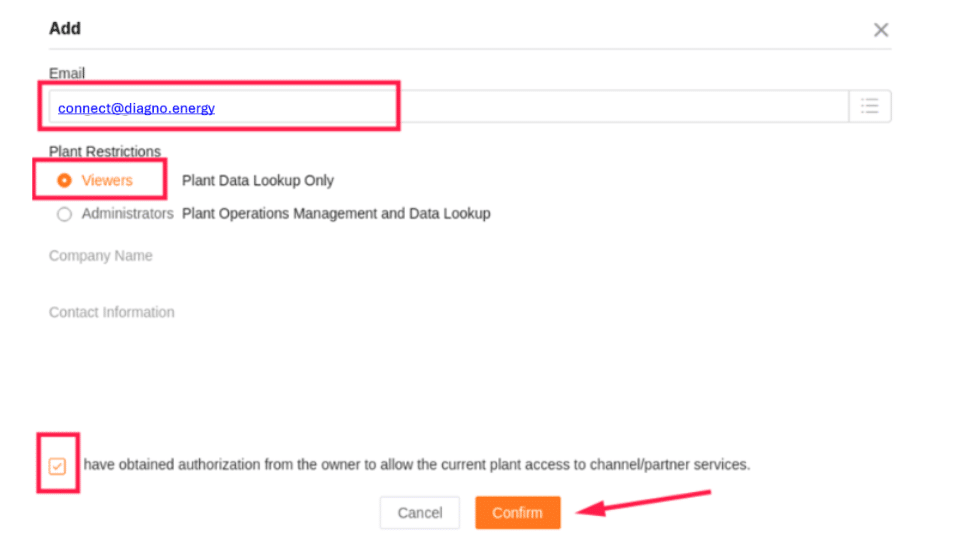
Scroll to Other Information and use the Channel/Partner dropdown to select Diagno. If Diagno is not listed, add connect@diagno.energy as a viewer instead.
In the plant configuration or plant information, locate the Plant ID shown below the system information. The ID contains 6 or 7 digits.
In Diagno, open Sites and select + Self-Onboard. In the Self-Onboarding flow, choose Sungrow as the data source and enter the Plant ID, plus either the exact plant name shown in iSolarCloud or one inverter serial number.
Continue through the site confirmation steps in Diagno to add the matching plant.
No. Your plant remains in iSolarCloud. Diagno connects to available data and adds a monitoring and analysis view that can include other supported manufacturers.
Diagno can work with telemetry from compatible Sungrow solar inverters, hybrid inverters, meters and batteries. Exact measurements depend on the installed equipment and data made available by iSolarCloud.
You need the 6 or 7 digit Sungrow Plant ID, plus either the exact plant name or one inverter serial number. You also need access to grant Diagno the required plant permission.
Yes. Connected Sungrow sites can appear alongside sites from other manufacturers supported by Diagno.
Create your Diagno account to start connecting your system. If you need help with access or compatibility, talk to our team.