
SMA

Monitor your SMA solar system

Track SMA inverter generation, DC inputs by MPPT and available grid signals in Diagno. Follow your system over time and bring connected sites into the same view as other supported solar systems.

What you can monitor

Inverter generation

Where SMA provides the signals, review AC generation power and phase-level active power, voltage and current.

DC inputs by MPPT

Inspect available DC input power, voltage and current across MPPT channels to compare the inverter inputs.

Grid connection

Where a compatible meter provides them, view grid power, import/export direction, power factor, and voltage and current by phase.

What to expect

Measurements depend on your system

Available measurements depend on your equipment and the data supplied through its monitoring portal.

How to connect

SMA sites use either the newer EnnexOS portal or the legacy Sunny Portal. Choose the portal you use, grant the access specified for that route, then identify the site in Diagno.
Monitoring portalsEnnexOS or legacy Sunny Portal
EnnexOS identificationFull site URL, plus exact plant name or one inverter serial number
Sunny Portal identificationExact site name and one device serial number
Access routeEnnexOS: invite connect@diagno.energy as Administrator. Sunny Portal: add connect@diagno.energy as Plant Administrator.

Connect an EnnexOS site

Use this route for sites in the newer SMA EnnexOS portal. You need permission to manage users; ask your installer to grant Administrator access and Owner rights if User Administration is unavailable.

  1. Open the site

    Sign in to SMA EnnexOS and select the inverter/site you want to connect.

  2. Open user administration

    Choose Configuration in the left menu, then User Administration or User Management. Select the control to add a new user.

  3. Invite Diagno as Administrator

    Enter connect@diagno.energy, set the right to Administrator, enter first name Diagno and last name Energy, then send the invitation.
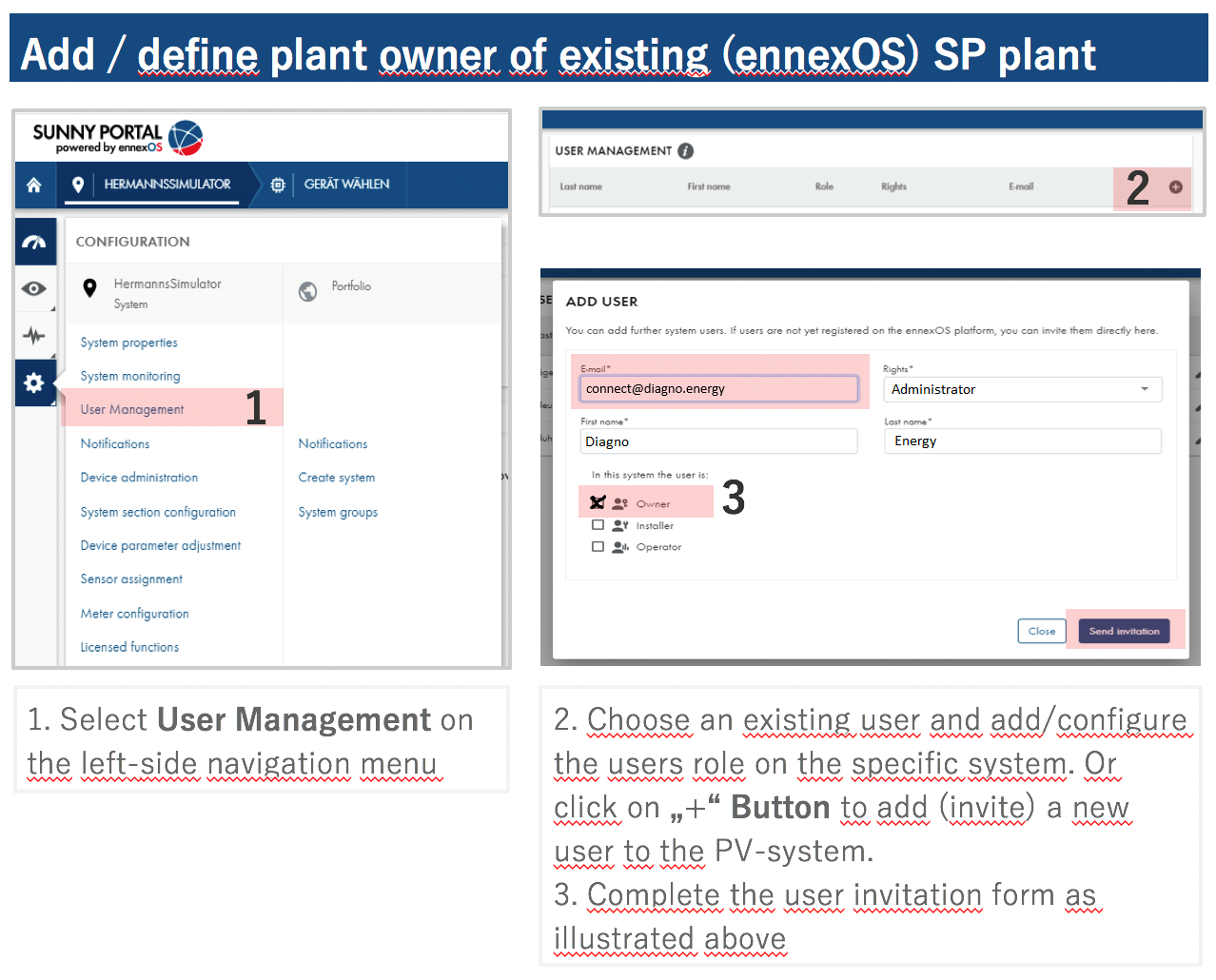
    SMA ennexOS User Management inviting connect@diagno.energy with Administrator rights
    Access settings shown in Diagno’s connection instructions. Portal appearance may vary.
  4. Copy the EnnexOS site URL

    Return to the site dashboard and copy its full URL from your browser address bar.

  5. Start self-onboarding

    In Diagno, open Sites and select + Self-Onboard. In the Self-Onboarding flow, choose SMA as the data source and EnnexOS as the portal. Enter the full site URL and either the exact plant name or one inverter serial number.

  6. Confirm the site

    Continue through the site confirmation steps in Diagno to add the matching site.

Connect a Sunny Portal site

Use this route for sites in the older SMA Sunny Portal. You need permission to manage users; ask your installer for Administrator access and Owner rights if User Management is unavailable.

  1. Open the plant

    Sign in to SMA Sunny Portal and select the plant you want to connect.

  2. Open user management

    Choose Configuration in the left menu, then User Management or User Administration. Select Add a new user.

  3. Add Diagno as Plant Administrator

    Enter connect@diagno.energy, assign the Plant Administrator role and save.
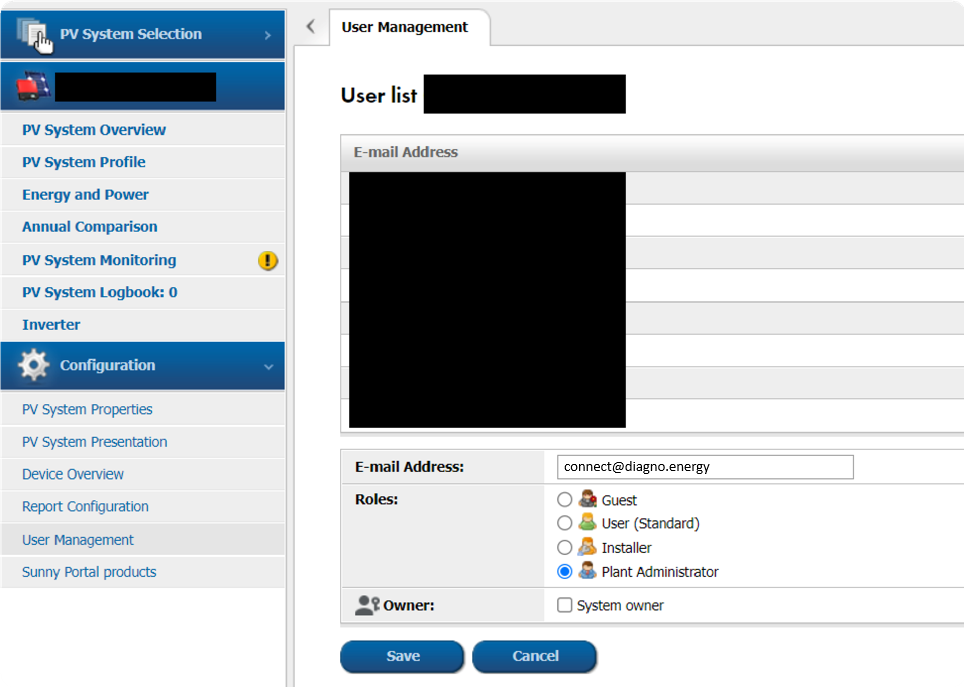
    SMA Sunny Portal adding connect@diagno.energy with Plant Administrator role
    Access settings shown in Diagno’s connection instructions. Portal appearance may vary.
  4. Note the exact site name and device serial

    Copy the site name exactly as it appears in Sunny Portal and one device serial number.

  5. Start self-onboarding

    In Diagno, open Sites and select + Self-Onboard. In the Self-Onboarding flow, choose SMA as the data source and Sunny Portal as the portal. Enter the exact site name and the device serial number.

  6. Confirm the site

    Continue through the site confirmation steps in Diagno to add the matching site.

Useful questions

Which SMA portal should I choose?

Choose the portal where you manage the system. EnnexOS is the newer portal; Sunny Portal is the older portal. The access and site details differ by route.

What details are required for EnnexOS?

Provide the full EnnexOS site URL and either the exact plant name or one inverter serial number. Invite connect@diagno.energy with Administrator rights.

What details are required for Sunny Portal?

Provide the exact Sunny Portal site name and one device serial number. Add connect@diagno.energy with the Plant Administrator role.

Can I connect a site if user management is missing?

Ask your installer for access to manage users. The EnnexOS instructions specify Administrator access and Owner rights; the Sunny Portal instructions specify Administrator access and Owner rights.

Get a clearer view of your system

Create your Diagno account to start connecting your system. If you need help with access or compatibility, talk to our team.